Upload a STEP file. Get a price you can defend.
PartPrice is quoting software for small CNC machine shops. Upload a STEP file, pick material and quantity; it reads the geometry, flags what will be hard to make, and builds the cost line by line - about 30 seconds for a typical part. Then it gives you a customer-ready PDF quote and the spreadsheet behind every number, every rate open to change.
We're onboarding a small group of design partners before public launch. Self-serve sign-up opens at launch.
| MaterialAl 6061-T6 billet, 25 pcs | $128.44 | 14.6% | |
|---|---|---|---|
| Machining≈ 11.4 min/pc at $85/hr | $402.10 | 45.6% | |
| Setup & programming2 setups · program on file | $141.67 | 16.1% | |
| Tooling & consumables | $52.30 | 5.9% | |
| Inspection & QC | $68.75 | 7.8% | |
| Finish & treatmentAnodize type II | $88.50 | 10.0% |
- Cost, 25 pcs
- $881.76
- Markup
- 30%
- Total
- $1,146.29
- Per piece
- $45.85
The problem
Quoting one part takes 20 minutes to 2 hours. The customer is waiting the whole time.
An RFQ lands as a STEP file and a quantity. Someone opens it in CAD, sizes up the stock, counts the setups, estimates the hours and prices it in the shop's spreadsheet. The answer goes out a day or three later - often after the customer has placed the order elsewhere.
That spreadsheet holds years of experience. But it can't read geometry, it lives with one person, and when a customer pushes back on the price, defending it line by line takes another hour - for an RFQ that may never turn into an order.
How it works
Three steps - and about 30 seconds of computing for a typical part
- 1
Upload
Drop in a STEP file - a single part or an assembly. PartPrice recognizes the geometry: stock size, volume to remove, holes, pockets and the features that need machining. You see it all in the 3D viewer.
- 2
Review
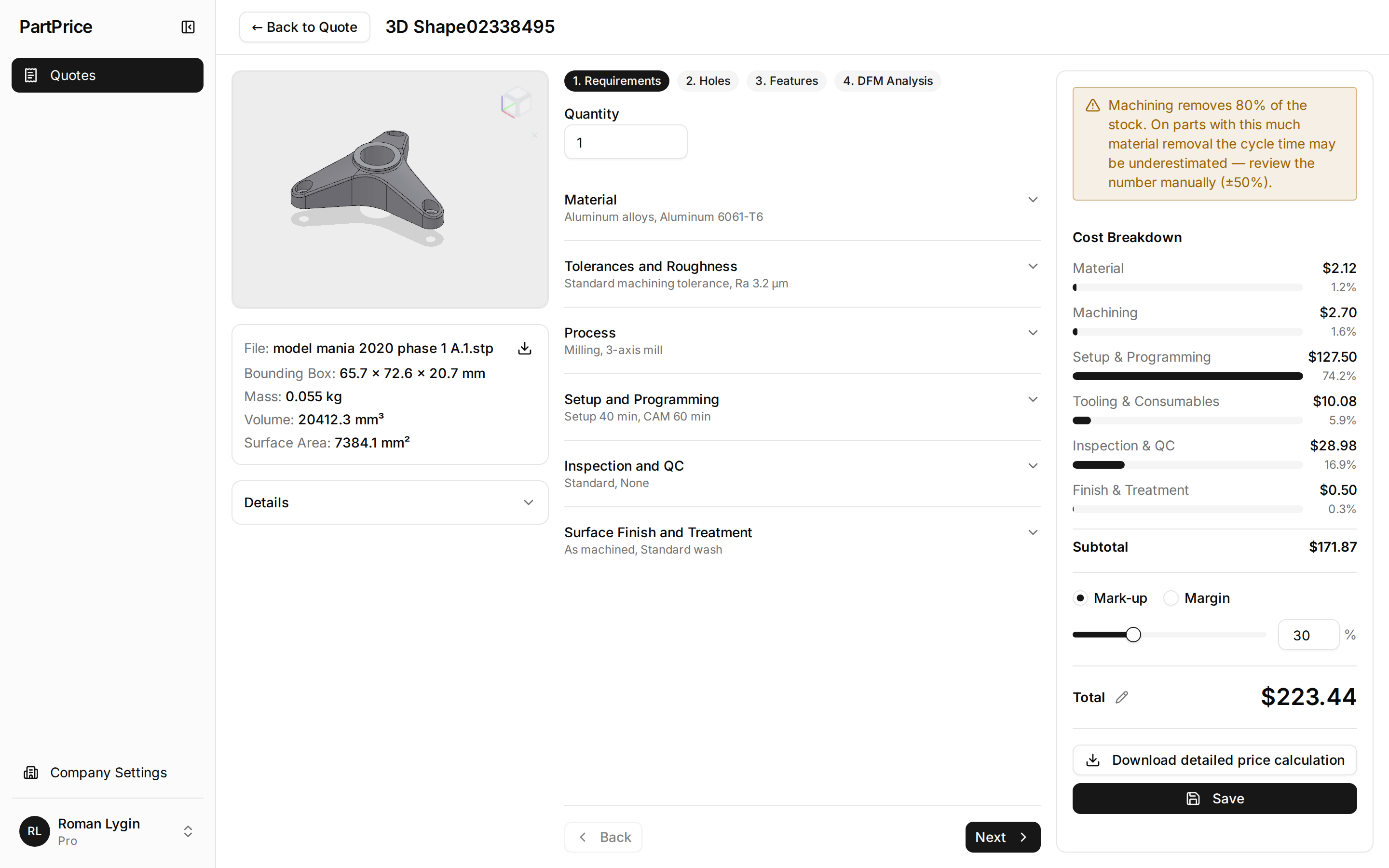
Set quantity, material, tolerances and finish; pick the machine and the number of setups. Read the manufacturability flags and the cost breakdown: material, machining, setup and programming, tooling, inspection, finish. Every rate is visible, and the Excel export lets you change any of them.
- 3
Send
Set your markup or margin. Download a PDF quote with your company details and terms - or the Excel file with the formulas behind every line.
What it looks like
Real screens, real parts - no mockups
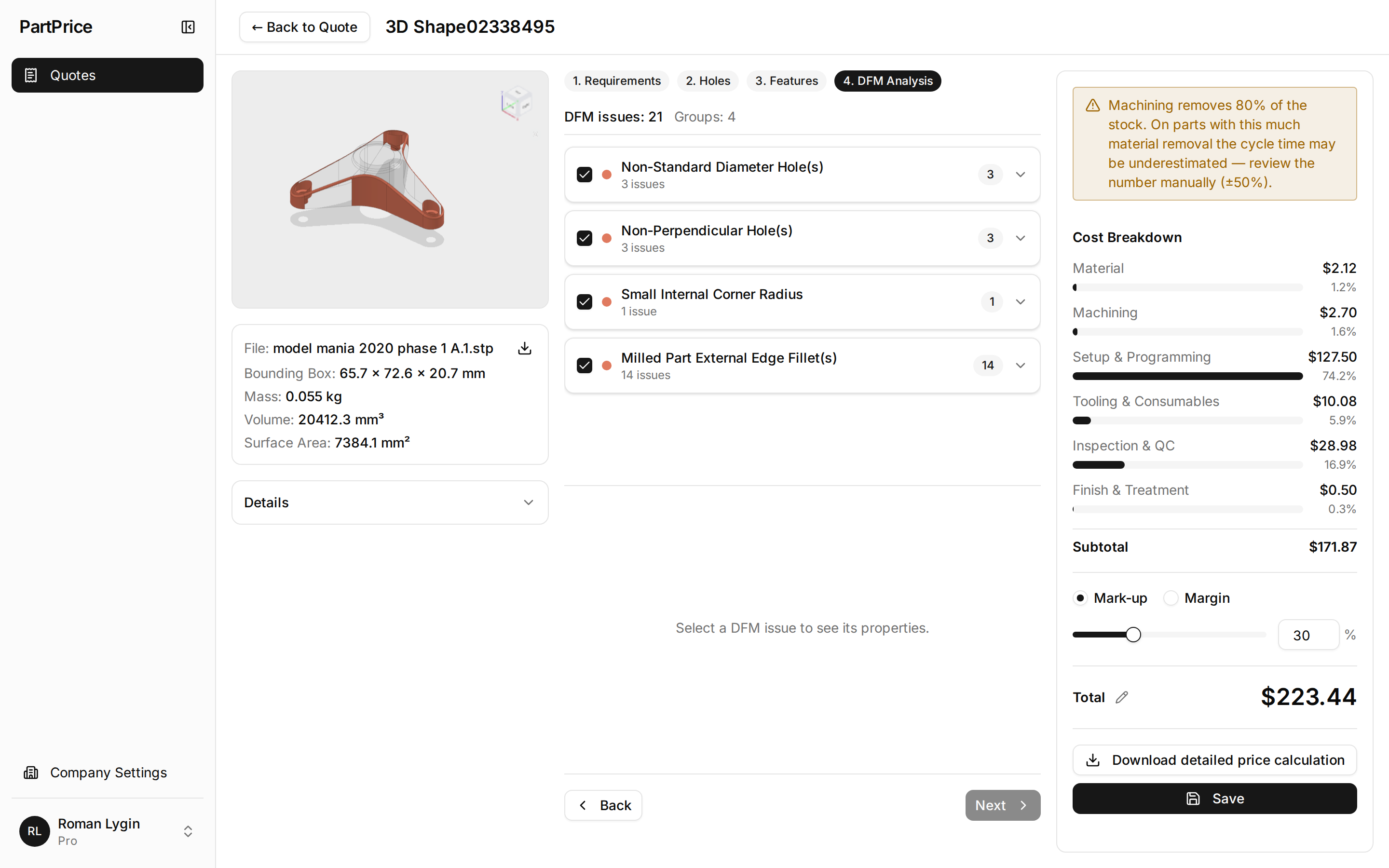
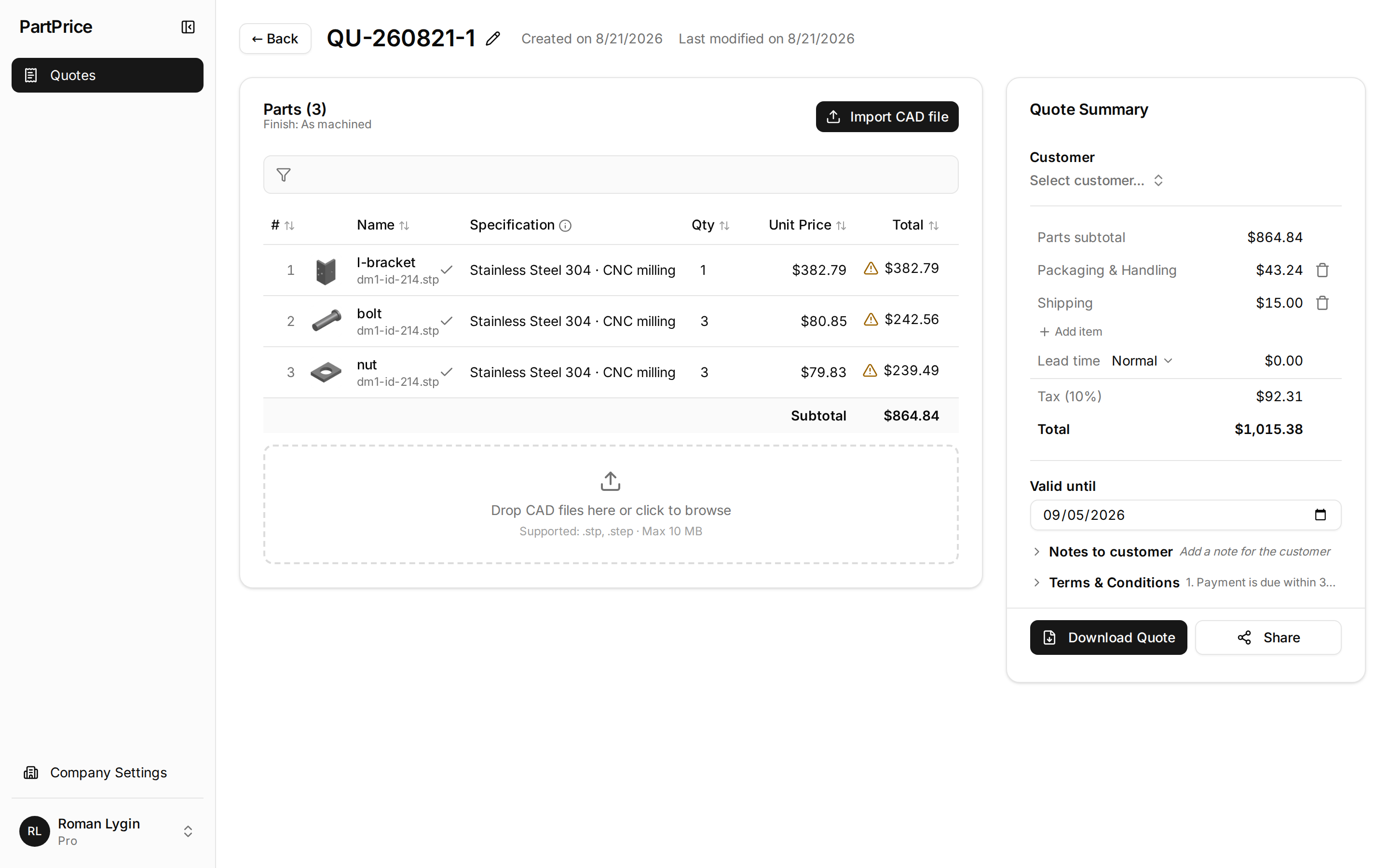
Taken from the current build on a sample bracket and a three-part assembly. The interface is still plain; the numbers are the point.
What you get
Everything the estimator needs to trust the number - and the customer needs to read it
A breakdown, not a black box
Material, machining, setup and programming, tooling, inspection, finish. Per part and per batch - so a second setup costs what it really costs at 5 pieces and at 500.
Manufacturability flags that matter
Deep holes, thin walls, deep pockets, features that force another setup - the DFM findings you want to see before you commit to a number, shown on the model. A practical signal, not a wall of rules.
Your shop's numbers
Your markup, your machines, your materials and stock sizes, your quote defaults - set once, applied to every new part. Every rate the model uses is listed in your settings and editable in the Excel export. And when the number is still wrong, type your own price over it - the quote and the PDF take yours. Shop-specific rate tables are next.
A 3D view of what's flagged
Rotate the part, see the recognized features and the flagged issues highlighted on the model.
A quote your customer can read
A PDF with your company details, terms and validity date. Ready to send.
Excel with the formulas
Download the whole calculation as a spreadsheet with live formulas - change any rate there, and the math leaves with you. Eight sheets: summary, inputs, material, machining, setup and programming, QC, finish, tooling.
How the lines are built, one by one: What's inside a PartPrice quote.
Today: CNC milling, STEP files (geometry only - tolerances, threads and finishes you enter), USD, one user per company. Next: turning, more CAD formats, more users, sheet metal. We'll tell you what isn't there yet.
Who it's for
A tool for manufacturers, not a marketplace
PartPrice doesn't take orders, doesn't route your RFQs anywhere and never competes with you for your customers' work. Your models and your prices stay yours.
Built for
- CNC job shops and prototype shops - roughly 5 to 30 people - quoting dozens of parts a month from 3D models
- Manufacturing brokers and contract manufacturers who price machined parts for their clients
- Shops that quote in a spreadsheet today and want the same people to answer more RFQs, faster
Not the right fit (yet)
- Shops that quote from 2D drawings only - PartPrice needs the 3D geometry
- Sheet metal, casting or molding only - not yet
- Shops that quote in a currency other than USD - not yet
- Large plants that need ERP integration, roles and SSO - later
FAQ
Questions you'll probably ask
Which file formats does PartPrice support?
STEP (.step, .stp) - single parts and assemblies. Native SolidWorks and Inventor files are on the roadmap. Fusion 360 and Onshape users: export STEP, and your parts work today.
Which manufacturing processes?
CNC milling today. Turning is next; sheet metal and injection molding are on the roadmap.
How accurate is a PartPrice estimate?
It's a starting estimate, not an oracle. PartPrice builds the number from the part's geometry and the rates in your settings, and shows every line, so you can check it, correct it - or type your own price over it - before it goes out. How close it lands on your parts is exactly what we're measuring with design partners right now; we'd rather show you on your own parts than quote a number here.
Is PartPrice a marketplace? Does it take a cut of my orders?
No. PartPrice is quoting software you run inside your shop - not a marketplace and not a manufacturing-as-a-service platform. We don't take orders, route RFQs or talk to your customers. There's no commission - only a subscription.
What happens to my CAD files?
They're uploaded to PartPrice's cloud, used only to compute your quotes, and deleted when you ask. We don't share them with anyone and we'll sign an NDA if you want one. A detailed data-handling page comes with the public launch.
What does PartPrice cost?
Pricing is published at public launch: a free trial on your own parts, then a subscription priced for small shops - PartPrice is a tool for commercial quoting, and we charge for it. No commission. Design partners get the Pro plan free for 12 months from public launch.
Can I change the numbers?
Yes. Markup, machine, setups, material, stock, tolerances and finish are yours to set per part, with company defaults for every new one - and you can type your own price over the estimate on any part. Every rate the model uses is listed in your settings, and the Excel export carries the formulas, so you can change any of them there. Per-shop rate tables are next on the roadmap.
Does it replace my estimator?
No - it does the mechanical part of the job: reading the geometry, sizing the stock, estimating times, laying out the breakdown. The estimator's time goes into the part software can't do - judgment - and the estimator has the last word on every number.
When can I sign up?
Self-serve sign-up opens at public launch. Until then we're onboarding a small group of design partners - apply for early access if you quote machined parts every week.
Design partners
Quote real parts with us before launch
We're looking for 5–8 design partners: small CNC shops and brokers who will run real RFQs through PartPrice and tell us where the numbers are off. You get the Pro plan free for 12 months from public launch and a direct line to the founder.
Not ready to apply? Keep me posted.
Leave your email and we'll write when pricing goes public, when self-serve sign-up opens and when there's news on turning. A few emails a year, no drip campaign, unsubscribe any time.
Used only to send you PartPrice updates. Privacy notice.
Thanks - you're on the list. We'll write when there's something worth reading.
Something went wrong and the address didn't go through. Please try again in a minute.